Some quick instructions for routing MIDI between
unimidi and other programs in OSX...
OSX (10.3 and above) has the ability built in to route MIDI between programs using something called Inter-Application Communication (IAC). IAC allows you to create a pair of virtual MIDI devices (an input and an output) that applications will see as though they are usual MIDI hardware devices. When you send MIDI instructions to the output, they show up at the input. Therefore, you can send MIDI to the output using one program and use the input in another program to receive the data.
You can control the IAC settings using the built-in
Audio MIDI Setup applications in the
utilities folder. That program allows you to create, edit and delete these virtual device pairs.
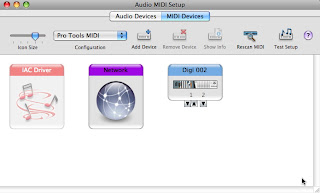
When Audio MIDI Setup is loaded you should see the window shown above. If you don't, select
Show MIDI Window from the
Window menu.
Double-click the
IAC Driver icon. Click
More Information if the
Ports menu is not showing. Make sure that there is at least one port listed -- this represents a single pair of virtual devices.
When working with Ruby, select the
IAC Driver from the list of unimidi inputs or outputs that corresponds to the port that you've created. For example, the first
IAC Driver output in unimidi will correspond to the output for the first set of ports in Audio MIDI Setup.
You can list your unimidi devices by using
unimidi list at the command line or using
UniMIDI::Device.all in Ruby.
Once you have these concepts down, you also have the option of using
MIDI Patch Bay for more complex routing and filtering.
Joe Le Brech made a video of using MIDI Patch Bay and IAC to send notes to GarageBand
He wrapped all of his Ruby code in a script called output.rb so you really can't see exactly what's going on the Ruby end of things...but it should give you a general idea of how this works

